


GPS Tracker: Find My Family
4.38.00 Reviews
App Specs
- Version
- 1.1.0
- Updated On
- License
- Free
- Downloads
- 1,000,000+
- Developer
- Mitra MT
- Categories
- Maps & Navigation
- Platform
- Android
Screenshots
 Analysis by AppCompare
Ever had that mini heart attack when you can’t reach your loved ones and wonder where they are? Well, I’ve been there, and that's exactly why I’m here to talk about the GPS Tracker: Find My Family app. This app is like having a digital guardian angel watching over your family’s whereabouts, so let's dive in and see what this app has to offer.
My overall take is that this is best viewed as a shared family location tool, not as a replacement for a phone’s built-in safety settings or a dedicated navigation app. Its appeal is straightforward: family members can share locations, receive place alerts, and use it to help find a misplaced phone. That combination can make ordinary coordination less stressful, but it works best when everyone understands what is being shared and agrees on how the group will use it.
Getting Started with GPS Tracker: Find My Family
First things first, setting up the GPS Tracker: Find My Family app is a breeze. You simply download it from the App Store or Google Play, and you’re good to go. The user interface is super intuitive, meaning even if you aren’t a tech whiz, you won’t find yourself pulling your hair out. Once you've created an account, you can invite family members to join your circle. Easy peasy!
Before relying on a family-location app, I’d agree on a few basics together: who will be in the circle, when checking a location is appropriate, and what everyone should do if a person’s position looks outdated or unexpected. That conversation matters as much as the setup. Location sharing is useful when it supports a practical plan—such as confirming that someone has arrived—not when it becomes a reason to monitor every movement.
There is also a platform question to consider. The app is in the Maps & Navigation category and is developed by Mitra MT. It is free to install, with in-app purchases priced from $2.99 to $9.99 per item, so I would check what any optional purchase offers before paying. It is rated for Everyone, and its current version is 1.0.4. The app has a 5.0 average from around 1.3 thousand ratings and more than 1 million installs, though those figures alone cannot tell you whether its specific workflow suits your household.
Features That Stand Out
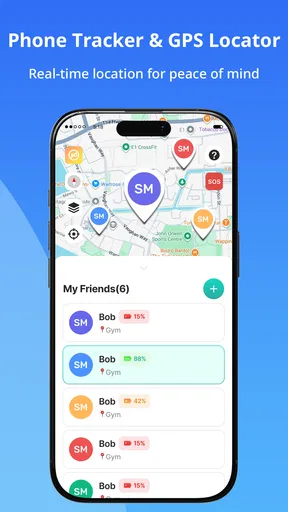
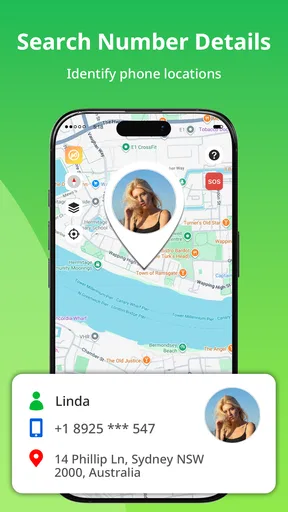
What’s cool about this app is the real-time tracking feature. It’s almost spooky how accurate it is! You can see exactly where your family members are at any given moment. But don't worry, it's not creepy because everyone in the circle has to give permission to be tracked. Privacy respected, folks!
In practical use, I’d treat a map position as a helpful indication rather than proof that someone is standing at one exact spot. Phones can be indoors, moving, or temporarily unable to provide a fresh position, and a location display is only useful if the person’s device is available and the sharing setup is working. If an arrival matters, a quick call or message is still the sensible backup. That small habit helps prevent a stale map pin from creating needless worry.
Worth Reading Before You Choose

Flipboard Shows What News Apps Must Do Beyond the Feed

Switching to Android Auto Means Rethinking Your Driving Routine

Google Calendar Makes a Crowded Week Easier to Manage

Ludo King Makes the Most of the Minutes Between Plans

Baby Panda World Brings Quick Play to Modern Phones, but Its Game Library Feels Busy

ESPN’s Live Game View Makes Following Close Games Easier
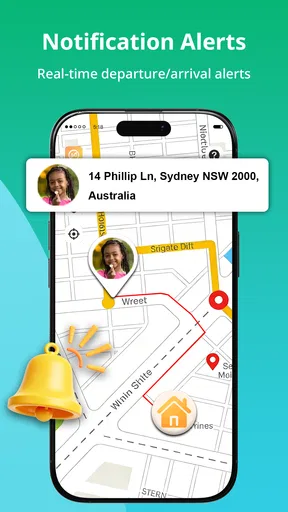
There's a nifty geofencing feature too. You can set up safe zones around your home, school, or workplace, and the app will notify you when someone enters or leaves these areas. Perfect for keeping tabs on the kiddos without being a helicopter parent.
Place alerts are most helpful when a zone has a clear purpose. For example, a parent might want a simple arrival signal for school, while another household may only need a reminder that someone has reached home. I would avoid creating lots of overlapping places: too many notifications can turn a useful nudge into background noise, and family members may start ignoring alerts altogether. Keep the zones few and meaningful, then adjust them if the notifications do not fit your routine.
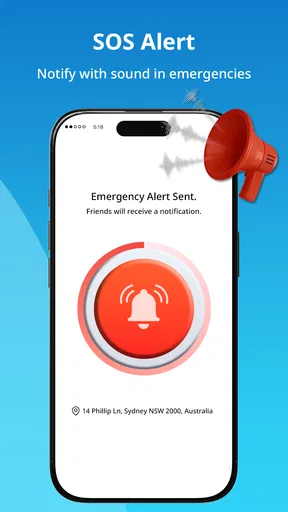
The app also boasts an emergency SOS feature. If a family member is in trouble, they can send an SOS alert with their exact location. It’s like having a panic button in your pocket, which is a huge comfort for both parents and kids alike.
An SOS button can be reassuring, but I would not make it the family’s only emergency plan. Everyone should know how to contact local emergency services and what to do if the phone is unavailable, out of battery, or cannot send an alert. A useful setup is to explain when to use SOS, who in the circle is likely to see it, and what the next step should be. That makes the feature part of a plan rather than a promise that technology can solve every emergency.
How It Enhances Everyday Life
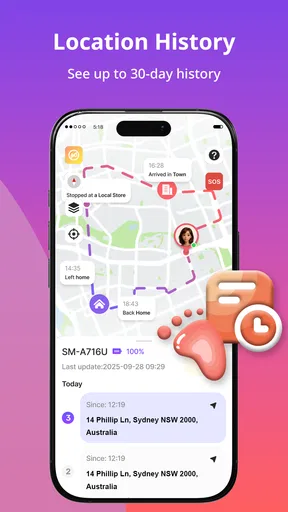
So, how does this app fit into daily life? Well, besides the obvious safety benefits, it can be quite a time-saver. No more playing phone tag trying to figure out where everyone is. Plus, if you’ve ever had a teen, you know how hard it can be to get them to respond to a text. With this app, you can see where they are, so you don't have to stress about their whereabouts.
A realistic example is a parent finishing work while a teenager travels home from an activity. Instead of sending repeated “Where are you?” messages, the parent can check whether the journey appears to be progressing and use an arrival alert as a prompt to follow up if needed. The important trade-off is trust: I’d present the app as a way to coordinate and check in, not as a hidden test of whether a teenager is behaving. Being transparent makes the tool more likely to remain useful as routines and independence change.
And if you’re planning a family outing, the app’s location sharing feature makes it super easy to coordinate. Just one tap and everyone knows the meeting point. No more “I thought we were meeting at the other entrance!”
For a crowded outing, I’d use shared location to reunite the group after people split up, rather than expecting it to replace a clear meeting plan. Pick a recognizable place and a backup meeting point before anyone wanders off. If a phone is misplaced, the family-location angle may also help you look for it, but it is not the same as a complete device-recovery system; keep ordinary device security and account recovery options in mind as well.
Compared with the usual alternatives, this app’s main draw is bringing family location sharing and place alerts together, with misplaced-phone help also part of its stated purpose. A phone’s built-in location-sharing tools may be enough if your household already uses the same platform and wants to avoid another app. A conventional maps app is a better fit when the task is route planning, traffic, or turn-by-turn directions. I would choose this one when the family needs a shared location view and alerts, rather than detailed navigation.
One practical question is whether everyone needs to install and join the same family circle. Since the app’s central use depends on shared family locations, it makes sense to plan around the people who will actively participate instead of assuming it can locate someone who has not joined or shared. If a relative is uncomfortable with ongoing sharing, agree on a lighter arrangement—or use a phone call for that person—rather than treating participation as compulsory.
Who Will Get the Most from It
I can see this being most useful for families with changing schedules: parents coordinating school pickups, relatives checking whether an older family member has arrived, or a household that often meets at busy public places. It can also suit people who routinely misplace a phone and want a family-based option to help locate it. The strongest use case is shared coordination among people who already trust one another and are happy to keep location sharing active.
It is less compelling for someone who only needs directions, live traffic, or a one-time location pin. In those cases, a regular navigation or messaging app may be simpler. I would also hesitate to recommend it to a household where people do not agree on tracking, or where one person expects continuous visibility without discussing boundaries. The app can make locations easier to see; it cannot settle disagreements about privacy or substitute for a conversation.
For an older relative, I’d make the setup as uncomplicated as possible: decide who is responsible for checking alerts, explain what an alert means, and avoid asking them to manage complicated routines on their own. For children, keep the explanation age-appropriate and distinguish an everyday arrival check from an emergency. Those choices make the app’s location tools easier to use without turning every notification into a family incident.
Final Thoughts
Overall, the GPS Tracker: Find My Family app is a fantastic tool for keeping your family safe and connected. It takes the anxiety out of not knowing where your loved ones are and wraps it up in an easy-to-use package. Whether you’re keeping tabs on your kids or making sure grandma made it to her doctor’s appointment, this app has got you covered.
That said, I’d describe the peace of mind as conditional, not automatic. It depends on the family agreeing to share locations, keeping expectations reasonable, and having a backup when a phone or connection does not cooperate. Alerts are most valuable when they answer a specific question—has someone arrived, or should we check in?—rather than prompting constant map-watching. A small, well-understood circle is likely to be more helpful than a large one with unclear responsibilities.
So, if you’re looking for peace of mind and a bit of tech-savvy family management, give this app a whirl. It might just become your new favorite family tool. Happy tracking!
My recommendation is to try it if shared family locations and place alerts solve a recurring coordination problem for you, and to discuss boundaries before inviting everyone. If your priority is turn-by-turn navigation, occasional sharing, or a setup that does not involve ongoing location access, choose a more focused alternative. Used with clear expectations, this app has a sensible role in family routines; used as a substitute for trust, communication, or emergency planning, it is the wrong tool.
Pros
- Real-time location tracking is accurate.
- User-friendly interface for all ages.
- Customizable alerts for specific zones.
- Battery-efficient operation for long use.
- Cross-platform compatibility is a plus.
Cons
- Requires constant internet connection.
- Privacy concerns with location sharing.
- Limited features in free version.
- Occasional in-app ad interruptions.
- May drain battery on older devices.
FAQs for GPS Tracker: Find My Family
How accurate is the GPS tracking feature in GPS Tracker: Find My Family?
The GPS Tracker: Find My Family app uses advanced GPS technology to provide precise real-time location tracking. Accuracy can vary based on factors like signal strength, location, and device settings. Typically, users can expect location updates within a few meters. For best results, ensure your device has a clear view of the sky and a strong internet connection.
Is my personal data secure when using the GPS Tracker: Find My Family app?
Yes, the GPS Tracker app prioritizes user privacy and data security. It employs encryption protocols to protect your data. Personal information is stored securely and is not shared with third parties without your consent. Always review the app’s privacy policy and adjust settings to enhance your security preferences.
Does the app work internationally, and are there any additional charges?
GPS Tracker: Find My Family works globally, allowing you to track family members anywhere in the world. However, using the app internationally may incur roaming charges from your mobile carrier, depending on your data plan. It's advisable to check with your provider for details on international data usage and associated costs.
Can I set up geofencing alerts in the GPS Tracker: Find My Family app?
Yes, the app allows you to create geofencing alerts. You can define specific areas on the map and receive notifications when family members enter or leave those zones. This feature is great for ensuring the safety of loved ones by alerting you to their movements in real time, offering peace of mind.
What devices are compatible with GPS Tracker: Find My Family?
The app is compatible with both Android and iOS devices. Ensure your device meets the minimum operating system requirements specified on the app's download page. Regular updates help maintain compatibility with newer devices and operating systems, so keep your app and device software up to date for optimal performance.


